
One Way Tickets Controls: Dashboard Layout, Mouse Actions, and Automation
One Way Tickets controls operate entirely through a lower-screen vehicle dashboard, requiring direct mouse clicks to fire weapons, hold-inputs to reload, rapid clicks to accelerate, and companion assignments to automate multi-station machinery while driving.
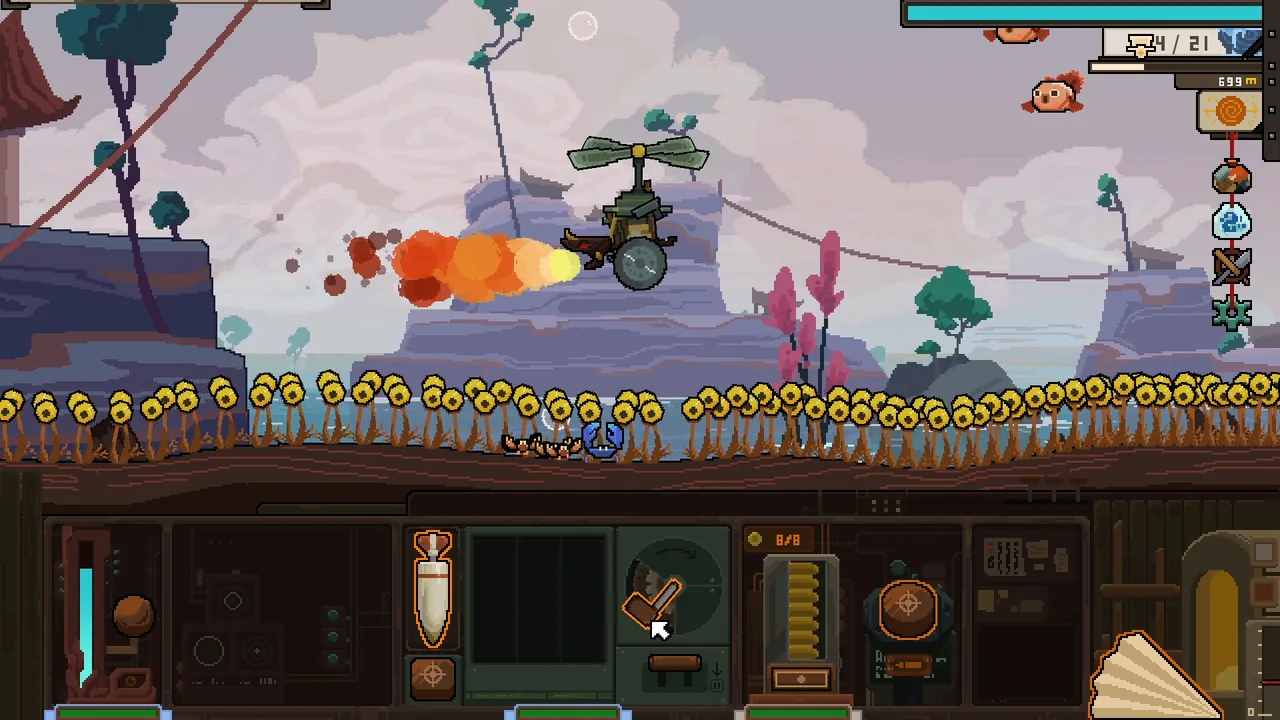
One Way Tickets controls operate entirely through a lower-screen vehicle dashboard, requiring direct mouse clicks to fire weapons, hold-inputs to reload, rapid clicks to accelerate, and companion assignments to automate multi-station machinery while driving.
Dashboard Interface and Direct Mouse Actions
The gameplay display divides into two primary sections. The upper window shows your vehicle traveling along the road, while the lower area houses the interactive dashboard containing all weapon consoles, meters, and maintenance tools. Because the game includes mouse-only support, every vehicle function routes through cursor interactions on this panel.
Individual components rely on distinct mechanical inputs rather than generic button presses:
- Weapon firing uses standard left-clicks on the active firing triggers located on the console edges.
- Weapon reloading requires holding down the reload button until the reload gauge fills completely.
- Vehicle acceleration requires repeated manual clicking on the throttle mechanism to build forward speed.
- Defensive shields demand continuous rotational mouse movement across the shield dial to adjust protection angles.
- Inspection requires pressing the Alt key to reveal stat cards; reviewing a different item requires releasing and pressing Alt again.
Console maintenance also takes place directly on the dashboard. When devices take heavy structural damage, you must grab the repair wrench and shake the mouse cursor left and right across the broken part to fix it. When environmental hazards or weather splash moisture across the panel, you drag a cleaning cloth over the glass, keeping the mouse pointer aligned with each droplet to wipe the surface clear.
Weapon Workstations and Crew Automation
Early runs position basic melee controls on the far left of the dashboard and ranged weapons on the far right. Operating both sides manually creates input conflicts during fast-paced encounters, especially when managing simultaneous enemy attacks from ground and aerial directions.
Automating these stations depends on crew placement. Through the Device Operator perk under camp upgrades, unlocked after meeting the Realm Companion requirement, passengers can man dashboard terminals beside you. Dragging recruited companions directly onto open weapon slots delegates operational tasks to their artificial intelligence.
The complexity of each station dictates how many crew members you must assign:
- Single-operator equipment, such as the Blunderbuss, requires only one aimed shot station, allowing a single crew member to aim and fire reliably.
- Complex hardware, such as the Rotary MG, requires three distinct workstations to manage ammunition feeding, directional aiming, and trigger firing.
- Uncrewed stations sit inactive until you manually intervene, which can lead to severe aiming problems if your main gun sits unhandled while you clear nearby road hazards.
Workstation Demands and Control Roles
Balancing manual inputs against companion skills ensures your mounted devices maintain steady output during an expedition.
| Dashboard Device or Action | Station and Input Demand | Recommended Operational Assignment |
|---|---|---|
| Blunderbuss | Single aimed workstation; requires standard aiming and firing cycles | Companion with accuracy perks like Kevin, or direct manual control |
| Rotary MG | Three separate workstations; requires ammo handling, gun turning, and firing | Full companion crew to maintain continuous operation |
| Throttle and Ram | Single acceleration station; requires rapid clicking or forward collision timing | Manual player control to time impacts against incoming road targets |
| Emergency Wrench | Manual click-and-hold interaction requiring left-to-right mouse shaking | Manual player intervention between enemy attack waves |
| Defensive Shield | Rotational dial interaction requiring active circular cursor tracking | Dedicated operator or manual adjustment during projectile bursts |
Operational Hazards and Interruptions
Several mechanical states can disrupt dashboard commands during travel. Road terrain causes physical vibrations, and severe shaking can inflict dizziness on your recruited companions. Dizzied companions collapse over their stations and stop working entirely, forcing you to step in and handle their consoles manually until they recover.
Resource gauges on the panel demand steady surveillance alongside combat inputs. Depleting your core reserves halts the vehicle entirely, making strict energy management mandatory before attempting long routes. If your vehicle stalls or your main weapons fail to respond, confirm that your companions are awake, workstations are fully staffed, and the energy gauge has not bottomed out.
Next step
Devices Guide
Learn how vehicle device workstations, combat ranges, and camp pre-mount upgrades function during early expeditions.
Related Guides
Vehicle Builds
Learn how to assemble balanced vehicle builds in One Way Tickets using proper chassis choices, device workstation pairing, and companion crew assignments.
Beginner Guide
Learn how to manage spirit energy, assign companion workstations, unlock early vehicle pre-mounts, and clear initial region bosses in One Way Tickets.