
One Way Tickets Rolling Log Bug: Causes, Fixes, and Workarounds
The One Way Tickets rolling log bug occurs when log shooters fail to fire, lose hit detection, or trigger infinite impact effects during severe engine frame drops caused by asset reloading loops and physics step limits.
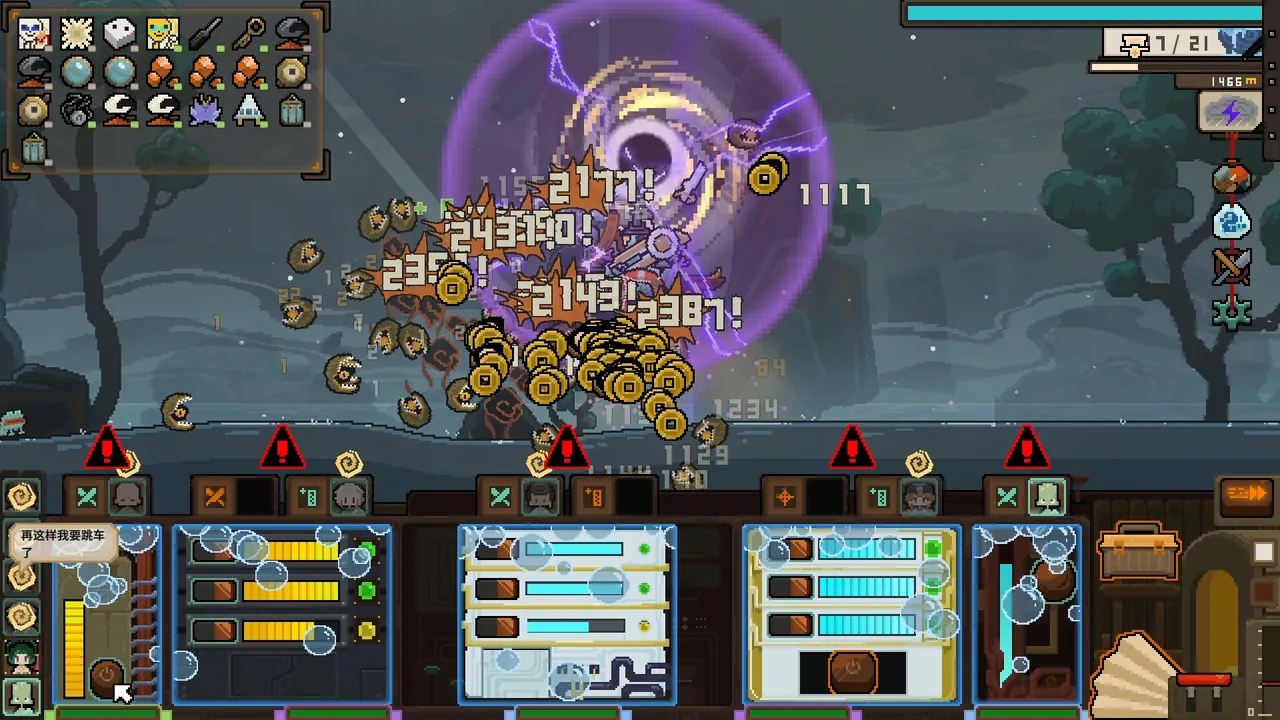
The One Way Tickets rolling log bug occurs when log shooters fail to fire, lose hit detection, or trigger infinite impact effects during severe engine frame drops caused by asset reloading loops and physics step limits.
How Rolling Log Glitches Manifest
Players running log-based weapon devices—identified internally by scripts such as DScript_Shooter_RollWood and Shooter_Roll_Wood—encounter three distinct issues during active runs:
- Failure to launch: The vehicle control panel indicates that the log shooter should fire, but no projectile spawns from the vehicle.
- Phase-through collisions: Rolling logs spawn and roll forward into enemies, but stack on top of each other without registering damage or triggering impact visual effects.
- Infinite ground impacts: Under certain physics loop conditions, logs repeatedly trigger ground-hit visual and sound effects without dissipating properly.
These issues are frequently accompanied by severe gameplay slowdowns where the game world appears to operate at quarter-speed or half-speed while the vehicle navigates dense regions.
Root Causes in Unity and Engine Performance
Technical logs analyzed in community bug reports reveal two primary factors behind the rolling log glitches: frame rate clamping and aggressive garbage collection overhead.
Physics Timestep Clamping
In Unity 2022.3, the game engine runs with a fixed timestep of 0.02 seconds and a maximum allowed timestep of 0.3333333 seconds. When heavy combat encounters or weather sequences drive the real frame rate down to between 0.75 and 1.5 FPS, the actual frame time reaches 667 to 1333 milliseconds. Because the engine clamps deltaTime at 0.333 seconds, in-game time slows down to 25% to 50% of standard speed.
Because rolling logs rely on discrete per-frame movement checks, an extended frame interval of several hundred milliseconds causes projectile physics to skip completely over enemy hitboxes between frames. The log travels past the monster without triggering a collision event.
Garbage Collection and Scene Reload Loops
Log analysis indicates that loaded objects can accumulate from an initial 4,139 up to 85,289 objects across long runs. Single sub-scenes (such as sub-scene node 420405) have been recorded reloading up to 9 separate times, repeatedly rebuilding shops and triggering garbage collection marking delays. As garbage collection pause times rise from an initial average of 11.3 ms to nearly 98 ms per cycle, the main thread hangs, dropping frames and breaking weapons not firing routines alongside log projectile detection.
Solutions and Player Workarounds
Developer patches and engine-level adjustments provide methods to resolve or minimize rolling log failures.
| Approach | When to Use | Action Required |
|---|---|---|
| Update to Patch v0.8.0.3 | Rolling logs trigger endless ground-hit visual effects | Install the latest Steam update to apply the official physics fix |
| Switch to Windowed Display | Runs experience extreme visual stutter and missed collisions | Switch display settings from fullscreen to windowed mode |
| Projectile Cap Management | High projectile counts cause massive lag | Rely on the engine cap of 150 projectiles or clear safe zone nodes |
The v0.8.0.3 update released on October 25 explicitly fixed an engine bug where rolling logs triggered ground-hit effects infinitely. This update also capped scene projectiles at 150 active units, automatically pruning the farthest projectiles when limits are exceeded to keep device calculations manageable.
Players experiencing projectile stacking or missed shots during extended sessions in demanding biomes can switch from fullscreen mode to windowed mode to alleviate display presentation stalls. When objects accumulate after visiting multiple safe zones and merchant shops, restarting the game client clears cached scene assets and resets garbage collection durations back to normal operating thresholds.
Next step
Weapons Not Firing
Find out why devices stop shooting in One Way Tickets and how vehicle energy or weapon targeting bugs affect combat.
Related Guides
Worm Boss Bug
Review details about the reported worm boss issue and track current Early Access updates for One Way Tickets.
Aiming Problems
Learn why vehicle weapons misaim in One Way Tickets and how companion handling, weapon placement, and control adjustments keep your attacks on target.
Beginner Guide
Learn how to manage spirit energy, assign companion workstations, unlock early vehicle pre-mounts, and clear initial region bosses in One Way Tickets.